Hive signal booster and range extender
The Hive Active Plug can relay the signal between compatible Hive devices and your Hive Hub. It extends the Hive device network, not your home Wi-Fi.
Prepared from existing project material on 24 October 2026. Editorial review: not yet recorded. Live figures use the current record; existing evidence dates are unchanged.
See also: Hive Active Plug review
What people mean by a Hive booster
If you search for a Hive booster, Hive extender or Hive repeater, the practical question is usually the same: how can a thermostat or radiator valve communicate reliably with the hub from another room? The Hive Active Plug combines a remotely controlled socket with a signal-boosting role on the Hive network. You do not need to attach a separate Wi-Fi extender to that plug for it to relay Hive signals.
Hive has also had a dedicated Signal Booster product. We do not claim that a separate extender has never existed or that its current stock status is known. This guide focuses on the Active Plug already assessed in our product review. Before buying, confirm the exact model and compatibility with Hive rather than treating every smart plug as an interchangeable repeater.
Zigbee mesh is not home Wi-Fi
There are different links involved in controlling heating through an app. The hub needs its own working internet connection, while compatible Hive heating devices communicate over the Hive wireless device network. The Active Plug supports that device-side Zigbee network. Adding it does not increase broadband speed, extend Wi-Fi to an upstairs laptop or fix a router that has lost its internet connection.
A mesh relay gives the radio signal another route between devices. It does not turn an incompatible thermostat into a Hive thermostat, remove the need for a compatible hub or replace depleted batteries in a thermostat or radiator valve. Identify which connection is failing before buying anything. If every device disappears together, first check the hub and internet connection rather than assuming every room needs a booster.
When a relay may help
A useful clue is one distant device repeatedly going offline while devices nearer the hub stay connected. Distance, the building layout and obstacles between rooms can weaken a wireless path. A thermostat upstairs or a radiator valve beyond a thick wall may benefit from a powered relay placed along the route. That is a possibility, not a guaranteed fix or a published coverage distance.
Check the device batteries, whether the hub is online and whether the problem started after moving furniture, changing sockets or repositioning the hub. A battery warning is not evidence of a range problem. If the heating receiver or boiler needs attention, follow the manufacturer’s instructions and use an appropriate professional; a smart plug is not a repair for a heating-system fault.
Pair it using the Hive instructions
Start with the Hive app and the installation instructions for your specific Active Plug and hub. Add the plug to the same Hive home, follow the pairing prompts and check that the app can control it. Use a suitable mains socket where the plug will remain powered. Avoid guessing button sequences from instructions for a different generation of product.
The relay needs mains power even when you are not using its appliance-control function. Turning the wall socket off removes that powered route. Keep the plug powered if another device relies on its position. Do not plug a boiler into it or use it to override a hardwired heating control. Check the plug’s load rating before connecting any appliance, and do not assume its booster function makes it suitable for every heater.
Position it between the hub and the weak device
Try a socket along the route, rather than putting the plug beside the device that has already lost contact. A relay must itself have a usable link to the network. Start in a position between the hub and the problem room, with space around it, and avoid hiding it in a metal cabinet or immediately behind a large appliance.
Treat positioning as a small, reversible trial. Change one location at a time and allow the system to settle before judging the result. Check normal heating schedules as well as a single app command. If the plug helps in one socket but not another, keep a note of both locations. There is no universal distance or number of walls that guarantees success in every UK home.
Product we've reviewed · affiliate link
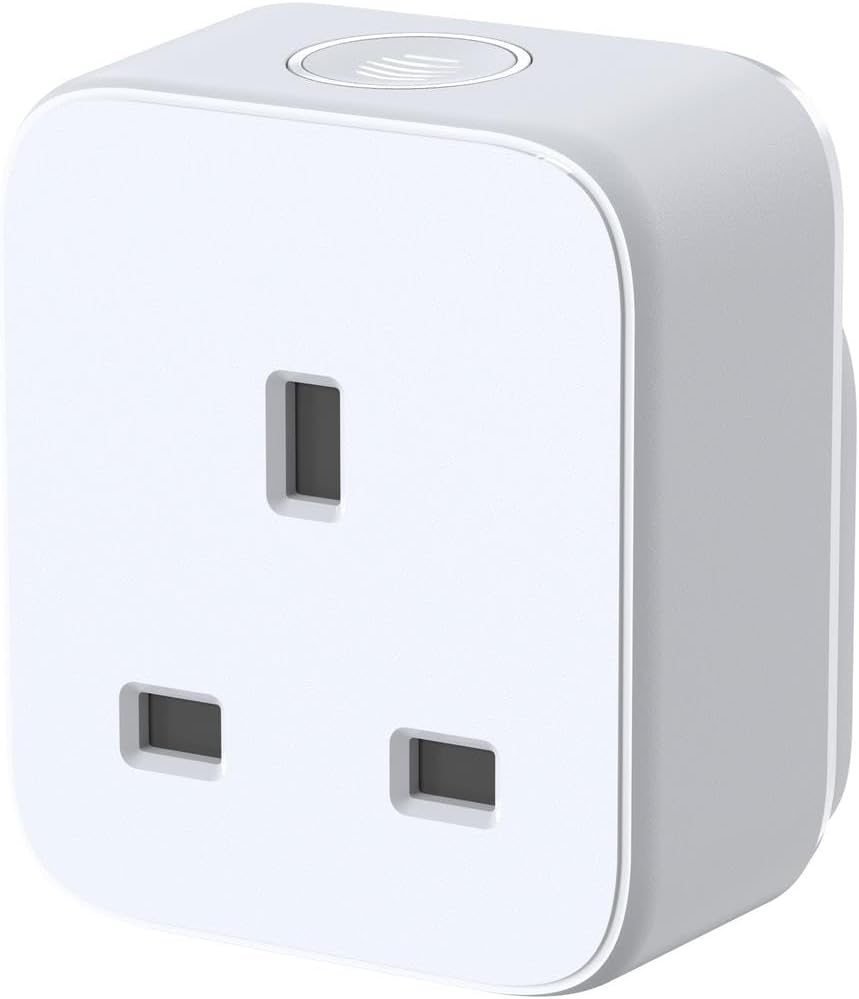
Hive Active Plug With Signal Booster Feature
A compatible Hive Active Plug can relay the Hive device signal between the hub and a weakly connected room; it does not extend home Wi-Fi.
Check first: confirm compatibility with your Hive Hub and keep the wall socket powered. This is product-information guidance, not a measured range test.
As an Amazon Associate PowerGuardian earns from qualifying purchases, at no extra cost to you. Our review is based on product information, not hands-on testing.
Troubleshoot before buying another device
If the device still goes offline, confirm that the plug remains visible in the app and that its wall socket has not been switched off. Recheck batteries and the original hub connection. Separate intermittent radio loss from an app outage or a heating problem. Repeatedly resetting the whole system can make diagnosis harder, so keep a short record of what failed, when it happened and which other devices were still online.
Contact Hive with the hub model, plug model, affected device and locations you tried if the problem persists. Ask whether the arrangement is supported before purchasing further hardware. Our Active Plug review discusses the product’s practical limitations and buying essentials; it is an assessment of product information, not a hands-on radio-range test. No signal strength, coverage or energy-saving figure is promised here. Keep the official installation guide alongside your notes so any later support request refers to the same model and supported setup.